
- Red Hat Community
- :
- DO188 - Red Hat OpenShift Development I: Introduction to Containers with Podman
- :
- Forum
- :
- Chapter 8. Container Orchestration with OpenShift...
- Subscribe to RSS Feed
- Mark Topic as New
- Mark Topic as Read
- Float this Topic for Current User
- Bookmark
- Subscribe
- Mute
- Printer Friendly Page


- Mark as New
- Bookmark
- Subscribe
- Mute
- Subscribe to RSS Feed
- Permalink
- Report Inappropriate Content
- 2,729 Views
Hello all, thanks for the amazing content on this course. However i am having trouble doing the exercises from chapter 8, for example section 8.4 guided exercise, i am having trouble with the guided exercise on chapter 8.2 as well ( i tried stopping and deleting the lab, and re-creating it again but the same issue persists, i am aware of the requirement of waiting 15-20 min after starting the labs, but this doesn't seem to help or have any connection even though i wait for it every time before starting an exercise):

Accepted Solutions

 Chetan_Tiwary_
- Mark as New
- Bookmark
- Subscribe
- Mute
- Subscribe to RSS Feed
- Permalink
- Report Inappropriate Content
- 2,649 Views
Hello @Presian1 !
Thanks for reaching out!
We are aware of this bug and this will be fixed in the upcoming release soon.
As a workaround do the following things :
1. Do not run any lab scripts until the cluster is ready as shown below :

2. Then run the lab start script on workstation : ( if you get error in running lab start script like project is already created then proceed to step 3 and then delete the project as shown in the screenshot in step 2 below. )
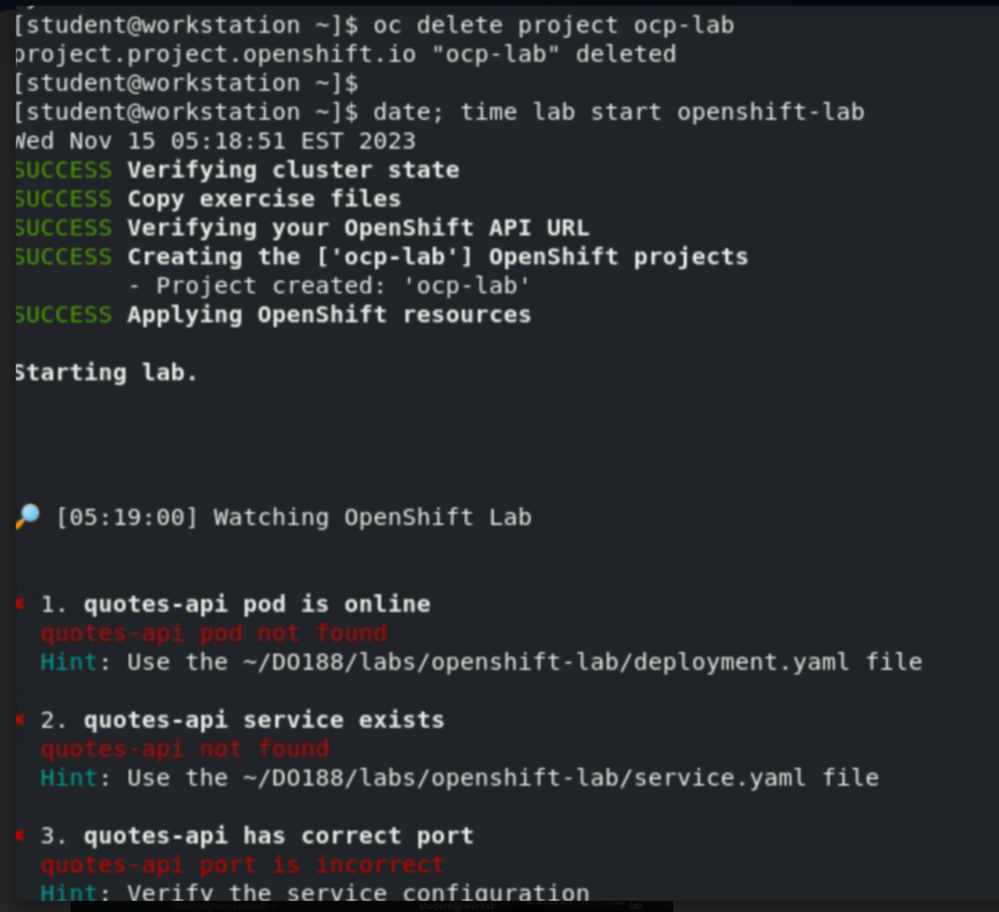
3. In a new tab proceed with next steps. If you get the error : missing or incorrect configuration info
As a workaround you can try this command : logging into the OCP cluster with :
oc login -u developer -p developer https://api.ocp4.example.com:6443
It will work.
*******************************************************
Please let me know if this does not work for you.
Chetan_Tiwary_
- Mark as New
- Bookmark
- Subscribe
- Mute
- Subscribe to RSS Feed
- Permalink
- Report Inappropriate Content
- 2,650 Views
Hello @Presian1 !
Thanks for reaching out!
We are aware of this bug and this will be fixed in the upcoming release soon.
As a workaround do the following things :
1. Do not run any lab scripts until the cluster is ready as shown below :
2. Then run the lab start script on workstation : ( if you get error in running lab start script like project is already created then proceed to step 3 and then delete the project as shown in the screenshot in step 2 below. )
3. In a new tab proceed with next steps. If you get the error : missing or incorrect configuration info
As a workaround you can try this command : logging into the OCP cluster with :
oc login -u developer -p developer https://api.ocp4.example.com:6443
It will work.
*******************************************************
Please let me know if this does not work for you.
- Mark as New
- Bookmark
- Subscribe
- Mute
- Subscribe to RSS Feed
- Permalink
- Report Inappropriate Content
- 2,586 Views
Hello, the last step helped. Thank you
Chetan_Tiwary_
- Mark as New
- Bookmark
- Subscribe
- Mute
- Subscribe to RSS Feed
- Permalink
- Report Inappropriate Content
- 2,584 Views
@Presian1 Thanks for letting us know that it worked.

Red Hat
Learning Community
A collaborative learning environment, enabling open source skill development.
